How to avoid warning messages from hyperref package in LaTex

\usepackage[unicode=true,pdfusetitle,
   bookmarks=true, 
   bookmarksnumbered=false, 
   bookmarksopen=false,
   breaklinks=false, 
   pdfborder={0 0 1}, 
   backref=false, 
   colorlinks=false]{hyperref}

\hypersetup{pdfauthor={Name}}

Use of hyperref package in a LaTex script makes the manuscript more visually understandable, but it often gives warning message like

Package hyperref Warning: Token not allowed in a PDF string (Unicode): (hyperref) removing `math shift' on input line 79.
Package hyperref Warning: Token not allowed in a PDF string (Unicode): (hyperref) removing `superscript' on input line 79.
Package hyperref Warning: Token not allowed in a PDF string (Unicode): (hyperref) removing `math shift' on input line 79.                     

Then, putting the snippet

\hypersetup{pdfauthor={Name}}

in a LaTex source file will remove the warning message or within the Lyx preamble section.

Posted in Uncategorized | Leave a comment

command line dictionary and thesaurus

To use command line dictionary and thesaurus, execute the following command:

sudo apt-get install dict dictd dict-gcide dict-moby-thesaurus

And, try

dict fundamental

which will show the definitions and synonyms of “fundamental” on the terminal screen.

Posted in Uncategorized | Leave a comment

How to generate a fixed format, sequential integers

The following bash script is to generate integers from 1 to 11, having 3-digit format.

#!/bin/bash
for i in `seq -f "%03g" 1 11`
do
   echo $i
done 
exit 0 

The result is as follows.

 001
 002
 003
 004
 005
 006
 007
 008
 009
 010
 011
Posted in Uncategorized | Tagged , | Leave a comment

Specific header settings of Emacs org-mode for LaTex export

#+LATEX_HEADER: \usepackage[margin=1.0in]{geometry}
#+LATEX_HEADER: \usepackage[numbers,sort&compress,square]{natbib}
#+latex_header: \usepackage{glossaries}
#+latex_header: \makeglossaries
#+latex_header: \usepackage{setspace} \singlespacing
#+latex_header: \usepackage{enumitem}
#+latex_header: \setlist[itemize]{noitemsep, topsep=0pt}
#+latex_header: \setlist[enumerate]{noitemsep, topsep=0pt}
#+OPTIONS: d:nil ^:nil H:2 toc:nil
  • 1st line: setting all four side margins, 1 inch.
  • 2nd line: natbib setup for numbered references of which citation is sorted and compressed, i.e., instead of [1,2,3,4] it will show [1-4].
  • 3rd and 4th: nomenclature setup
  • 5th line: linespacing setup, single and double
  • 6th and 7th lines: setting line gaps between enumerated and itemized ones zero.
Posted in Blog | Tagged , , | Leave a comment

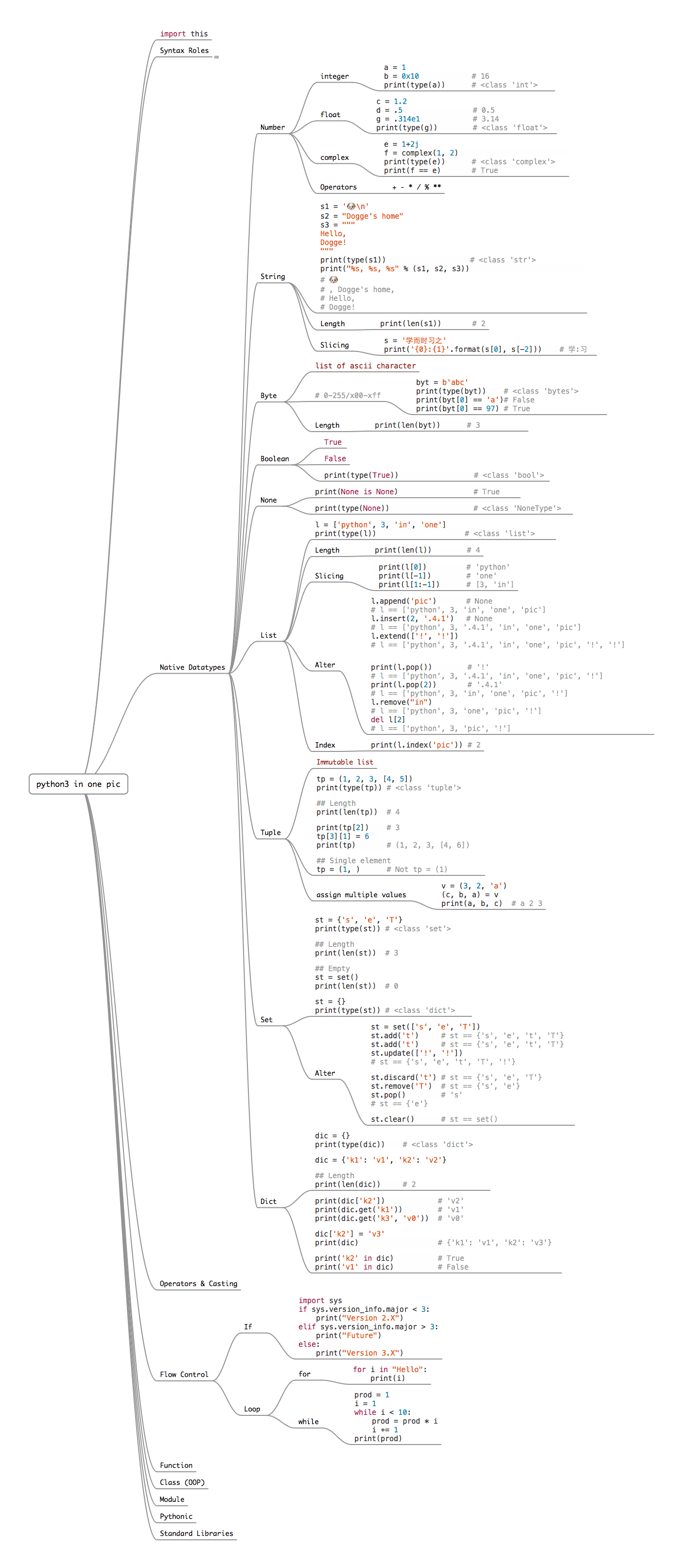
Learn The Entire Python Language In A Single Image (link)

An interesting page that contains a single image for python language. Here.

Image link: Here

Posted in Uncategorized | Leave a comment

How to replace the 4th occurrence of a character in a file using sed

sed -i "s/\"/ \"/4" myFile.txt

The above command will replace the 4th occurrence of by in file “myFile.txt”, which is equivalent to putting a space in front of the 4th double quote.

Posted in Uncategorized | Tagged | Leave a comment

How to change an extension of many files

In a Linux terminal:

$ for f in *.txt; do mv -- "$f" "${f%.txt}.text"; done

will rename all *.txt to *.text files.

Posted in Uncategorized | Leave a comment

How to compile .tex file without stopping

Method 1: using pdflatex to generate a pdf file

$ pdflatex   -interaction   nonstopmode   myTexFile.tex  

Method 2: using latexmk to generate a dvi file.

$ latexmk   myTexFile.tex 
Posted in Uncategorized | Leave a comment

How to write output values to the standard output without carriage return in FORTRAN

How to write output values to the standard output without carriage return:

program tstNoadv
 integer :: i
 do i = 1, 10
 write(*,"(A1,I6.4,$)") char(13), i
 call system("sleep 1")
 end do
 write(*,*) "Done"
 stop
end program
Posted in Uncategorized | Tagged | Leave a comment

How to make a pdf output from LyX without opening LyX file

Suppose you have a LyX file, my_thesis.lyx, in the current directory. Then, simply execute a command:

$ lyx -e pdf2 my_thesis.lyx

This will generate an output PDF file: my_thesis.pdf. If a PDF file of the same name already exists, it will be overwritten by the newly generated one.


Posted in Lyx | Leave a comment